https://www.dropbox.com/sh/6bm83ko107dkqld/AACm5tH_MM3lW99-yNfLkR2ka?dl=0
https://www.dropbox.com/s/sv4r9j6d1nardlk/01.mp3?dl=0

這個升學制度既【不透明】也【不公平】
http://www.nownews.com/n/2014/08/20/1378367
引用 【Yan De Lin】
【考幾分進什麼學校確實不是重點。重點是升學制度要公平,透明,才對得起學生。】
這個升學制度既【不透明】也【不公平】,完全是【黑箱】。
簡單的懷疑:
管理選填志願之電腦系統之團隊,絕對有能力揭露以下訊息,
只要在選填志願截止前洩漏諸如:
1.【到目前為止,X高中尚有N名額無人選為第一志願】這種訊息,
2.【把X高中選為第一志願者,5A有幾人,4A1B有幾人】,
哇!這種情報多有價值啊!
Posat Guanzuzai
引用友報留言【懷疑】兄的合理假設如下:
【我在乎的是有無在志願選填截止前得不應該外洩的資料,
60.25*****166】
的確,是有人(比如監控填志願電腦系統者及其長官們,他
是否該有人去查一查?
【我在乎的是有無在志願選填截止前得不應該外洩的資料,
60.25*****166】
的確,是有人(比如監控填志願電腦系統者及其長官們,他
是否該有人去查一查?
2014年十大高薪工作
2014年十大高薪工作

還
有必要上大學嗎?當然需要,如果你想要一份掙大錢的工作。就業門戶網站Careercast.com的最新排名顯示,2014年薪資最高的工作排名中幾乎所有工作都需要有一份高學歷。十大最具吸引力的崗位中,有七個屬於醫療行業。
今年(2014),我陪著孩子,從5月中到8月中。
今年,我陪著孩子,從5月中到8月中,前後三個月,一起經歷所謂12年國教的第一屆升高中事件。有幾點心得:
1. 根據小孩國中三年的在校學業表現(班排1~2名,校排20~40名),我判斷,學業程度可上傳統的前三志願高中。孩子自己在考前全力衝刺,把不必要的英文補習課暫停,仍維持從小有興趣的鋼琴課,最後考出 4A1B(2A++,1A+,1A, 1B++)的成績,坦白說,不算失常,是他原有學業能力的表現,我沒有去精算換算成舊時的PR值,只約略用統計學的常識初步推估,若在往年,的確可以上前三志願。只是今年的遊戲規則改了,由於B++發生在國文,再加上作文4級分的雙重效應,讓他的排序,連降18級!
以下有位統計高手做出的統計數據以及解釋,或可做為參考。
http://tsjh301.blogspot.tw/2013/05/compulsory-education.html


【國文差一題竟然連降18級】2013/5/27

問:「十二年國教」是一場擾民的騙局,為何一定要實施?
答:不實施看看怎麼會知道是不是騙局,萬一成功就可以歷史留名了。
1. 根據小孩國中三年的在校學業表現(班排1~2名,校排20~40名),我判斷,學業程度可上傳統的前三志願高中。孩子自己在考前全力衝刺,把不必要的英文補習課暫停,仍維持從小有興趣的鋼琴課,最後考出 4A1B(2A++,1A+,1A, 1B++)的成績,坦白說,不算失常,是他原有學業能力的表現,我沒有去精算換算成舊時的PR值,只約略用統計學的常識初步推估,若在往年,的確可以上前三志願。只是今年的遊戲規則改了,由於B++發生在國文,再加上作文4級分的雙重效應,讓他的排序,連降18級!
以下有位統計高手做出的統計數據以及解釋,或可做為參考。
http://tsjh301.blogspot.tw/2013/05/compulsory-education.html
【國文差一題竟然連降18級】2013/5/27
問:「十二年國教」是一場擾民的騙局,為何一定要實施?
答:不實施看看怎麼會知道是不是騙局,萬一成功就可以歷史留名了。
中部學生沒考國中會考 填台北市成功高中還錄取
中部學生沒考國中會考 填台北市成功高中還錄取
在台北市為第三志願的「台北市立成功高中」,基測的錄取成績不低,到了十二年國教上路時,想穿上成功高中的白襯衫、黑長褲,在國中會考大約要獲得4A1B,全部的平均積分約在88分。但卻有學生的國中會考成績0分,就錄取成功高中,這是怎麼回事?
http://www.appledaily.com.tw/appledaily/article/headline/20140821/36036168/
引用友報留言【懷疑】兄的合理假設如下:
【我在乎的是有無在志願選填截止前得不應該外洩的資料,例如某高中填的人數少於招生名額,導致部分人違反常理的志願選填。需要說明究竟部分違反常規者在何時完成志願選填?是最後時間?或是幾乎90%人都填完?那是不是有弊端?是不是有不該洩漏的資料有人得到?
60.25*****166】
的確,是有人(比如監控填志願電腦系統者及其長官們,他們應該沒有入闈、每天正常上下班吧!)可以在95%或99%的人都填好志願時,而填志願時間尚未截止時,發放消息給特定人,指導其如何選填志願!
是否該有人去查一查?
如果我有機會在最後1小時或10分鐘,獲得某種資訊,比如:「截至目前為止,尚無人選填建中做為第一志願」,或「成功高中尚有10個名額無人選填」,那我應會「即時」改變自己所填的志願序吧!
是否該有人去查一查?
http://www.appledaily.com.tw/appledaily/article/headline/20140821/36036168/
引用友報留言【懷疑】兄的合理假設如下:
【我在乎的是有無在志願選填截止前得不應該外洩的資料,例如某高中填的人數少於招生名額,導致部分人違反常理的志願選填。需要說明究竟部分違反常規者在何時完成志願選填?是最後時間?或是幾乎90%人都填完?那是不是有弊端?是不是有不該洩漏的資料有人得到?
60.25*****166】
的確,是有人(比如監控填志願電腦系統者及其長官們,他們應該沒有入闈、每天正常上下班吧!)可以在95%或99%的人都填好志願時,而填志願時間尚未截止時,發放消息給特定人,指導其如何選填志願!
是否該有人去查一查?
如果我有機會在最後1小時或10分鐘,獲得某種資訊,比如:「截至目前為止,尚無人選填建中做為第一志願」,或「成功高中尚有10個名額無人選填」,那我應會「即時」改變自己所填的志願序吧!
是否該有人去查一查?
小孩升學事宜
https://zh.wikipedia.org/wiki/繁星推薦
https://www.caac.ccu.edu.tw/star103/query.php
臺北市立麗山高級中學 103 學年度繁星推薦校內推薦作業實施計畫
http://www2.lssh.tp.edu.tw/~academic/register/2.12plan_stars-.pdf
https://www.caac.ccu.edu.tw/star103/103vmp_starColQry/html/103_00159.htm
https://www.caac.ccu.edu.tw/star103/103vmp_starColQry/html/103_00138.htm
https://zh.wikipedia.org/wiki/大學學科能力測驗
現今學測的日期大都訂在農曆過年之前。
2015年2月01&02日
https://www.caac.ccu.edu.tw/star103/query.php
臺北市立麗山高級中學 103 學年度繁星推薦校內推薦作業實施計畫
http://www2.lssh.tp.edu.tw/~academic/register/2.12plan_stars-.pdf
https://www.caac.ccu.edu.tw/star103/103vmp_starColQry/html/103_00159.htm
| |||||||||||||||||||||||||||||||||||||||||||||||||||||||||||||
https://www.caac.ccu.edu.tw/star103/103vmp_starColQry/html/103_00138.htm
| |||||||||||||||||||||||||||||||||||||
台大錄取生 逾半來自雙北
台大錄取生 逾半來自雙北
|
| 2014/08/06 |
【聯合晚報╱記者游婉琪╱台北報導】大學考試分發今天放榜,台灣大學錄取的1801名準新鮮人中,來自雙北的學生人數依然最多。台灣大學註冊組統計,錄取新生中有30.82%來自台北市,來自新北市的也有21.65%,雙北加起來超過五成,其次依序為台中市11.44%、桃園縣7.61%、高雄市7.16%。
|
臺北市立麗山高級中學
這是建中條列的資訊,很清楚!麗山應該一樣。
103 年國中教育會考單科 PR97 之對應答對題數表
數理類
PR97 之對應答對題數
數學 26
自然 52 A++
數學或自然科達標準者即符合報名資格。
數理資優班甄選試題
台北市立麗山高級中學第十一屆資優班iSeven成果發表會
發佈日期:2012年6月21日
103學年度新生報到須知
http://www2.lssh.tp.edu.tw/~academic/newcomers.html
103 學年度與新生家長「相約在麗山」邀請函
http://www2.lssh.tp.edu.tw/~academic/newcomers/103invitation.pdf
臺北市立麗山高級中學 103 學年度
103 學年度與新生家長「相約在麗山」邀請函
http://www2.lssh.tp.edu.tw/~academic/newcomers/103invitation.pdf
臺北市立麗山高級中學 103 學年度
數理學術性向資賦優異學生入班鑑定安置計畫
103.08.15
受理報名
103.08.17 日 初選
103.08.22 五 複選
http://www2.lssh.tp.edu.tw/~academic/newcomers/103specialed.pdf
臺北市立麗山高級中學
曾一度名為「麗山科學高中」
實施跑班制
一班約20-30人,學生可按照興趣選修,拆班上課;數理資優班另設有書報討論課程兩學分。且數理資優班只能選修理組科目。
2010年高瞻計畫第一期結案,赴新加坡參訪頂尖數理高中,
歷任校長[編輯]
台北市立成淵高級中學
台北市立成淵高級中學
到85年7月1日又改制為高中,並試辦「綜合高中實驗課程」;
是台北市第一所試辦「綜合高中」的公立中學,本校奉市 政府正式核定自85年
7月1日校名變更為「台北市立成淵高級中學」,自此改制確定,校史邁入另
一階段。
2007年8月1日 趙雅鈴校長 接棒掌舵,成為成淵建校百十年首位女性校長,
到85年7月1日又改制為高中,並試辦「綜合高中實驗課程」;
是台北市第一所試辦「綜合高中」的公立中學,本校奉市 政府正式核定自85年
7月1日校名變更為「台北市立成淵高級中學」,自此改制確定,校史邁入另
一階段。
2007年8月1日 趙雅鈴校長 接棒掌舵,成為成淵建校百十年首位女性校長,
臺北市立和平高級中學
【高三升大學】大學錄取榜單(08/06)更新
本校103學年度升大學榜單成績亮眼!全校錄取囊括
臺大7人、
清大6人、
交大7人、
成大15人、
中央15人、
政大15人、
臺師大18人、
中山8人、
中正10人,
臺北大學16人等
總計破百位高三學生上榜頂尖大學
http://www.hpsh.tp.edu.tw/mediafile/14700016/fileweb/44/documents/103mathscience_regulations.pdf
103.8.15 報 名
成 就 測 驗
或 實 作 評
量
103.8.19 二 ◎時間:08:00~12:00

http://www.hpsh.tp.edu.tw/
和平高中位於臺北市大安區,
周邊文教機構林立為全臺北市最富文化氣息的精華地區。
鄰近臺大、師大、臺科大及國立台北教育大學等大學院校,
為臺北市文風鼎盛之文教區。
https://goo.gl/maps/oI5Gh
【發稿日期】:103年7月15日(星期二)
【主題】:有關報載本校將改隸北市大附中案新聞說明稿
【臺北報導】
有關報載本校將改隸北市大附中乙案,目前尚無明確改隸時程。目前兩校正在進行工作小組會議及撰寫計畫書,過程中將透過社區座談會、家長座談會、學生座談會等各項會議廣泛收集意見,完成改隸計畫書後,將先送校務會議審議,計畫書審議通過後再報教育局審核。本案相關資訊皆已在學校首頁公告,感謝各界關心。
http://www.hpsh.tp.edu.tw/editor_model/u_editor_v1.asp?id={6D0E9572-2F94-4991-935E-374C83D5E929}
...
臺北市立和平高級中學 Taipei Municipal Heping High School
地址:10671臺北市大安區臥龍街100號
Address: 10671 No.100, Wolong St.,Da-an District, Taipei City, Taiwan(ROC)
捷運
文湖線 六張犁站 步行約10分鐘,新店線 公館站 轉乘公車經基隆路即可抵達本校。
公車
| 和平高中 | 1、207、254、294、611、650、672、905(含副線)、906(含副線)、909、935、1032、1551、1552、紅57、敦化幹線、275 |
| 自來水處(辛亥) | 237、295、298、673、907、棕12、棕22、綠11 |
| 捷運六張犁站 | 15、18、72、211、282、285、292(含副線)、556、680、685、902、1503、和平幹線 |
| 臥龍街 | 52、235、278、284、662、663 |


離長庚醫院台北院區較近的捷運站是 ”捷運文湖線 ”上的 中山國中站 ,
於 六張犁站 下車,步行 750 公尺,到達 和平高中。

https://www1.cgmh.org.tw/frms/cgmhline/cgmhline03.html
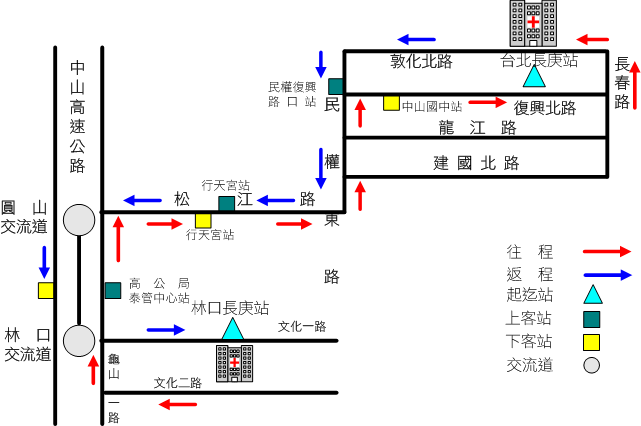
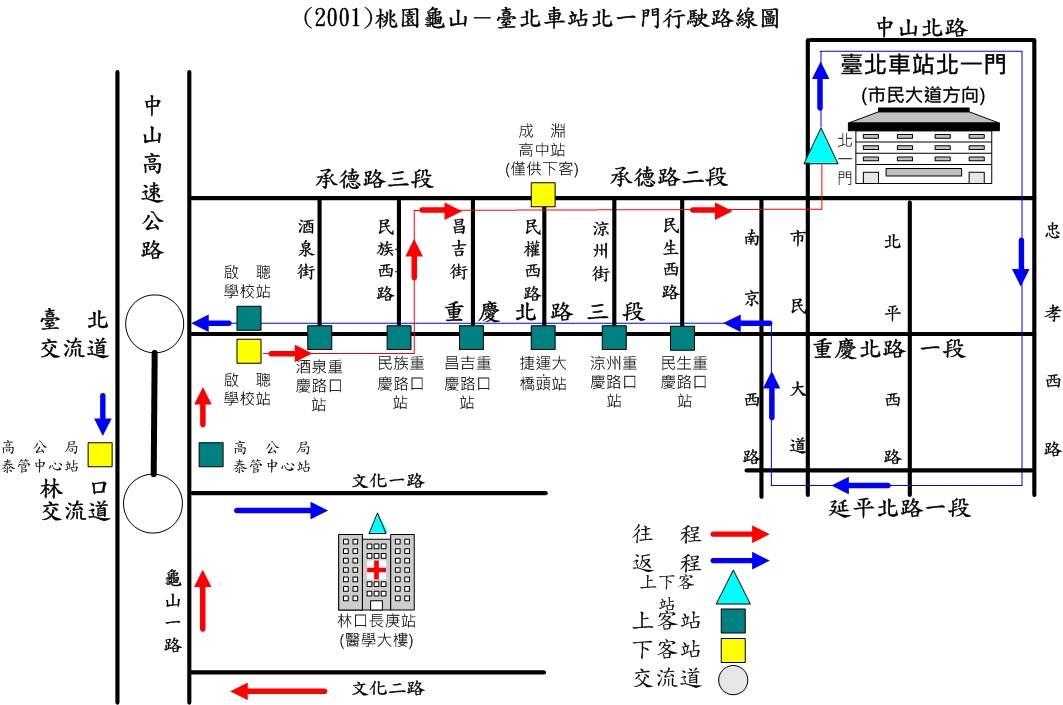
通勤專車,代號說明:
北庚:由社區→北庚
北門:由社區→北門
北庚 06:05
北庚 06:35
北庚 06:50
北庚 07:15
北門 06:25
https://www1.cgmh.org.tw/frms/line/2000line_a.html
https://www1.cgmh.org.tw/frms/line/2001line_a.html
------------------------------------------------------
早上交通車有 4 班 0605, 0635, 0650, 0715
社區 --(交通車)--> 中山國中 --(捷運文湖線)--> 六張犁 --(步行 10 min) --> 和平高中
社區 --(交通車)--> 台北長庚 --(公車275) --> 和平國中 --(步行 5 min) --> 和平高中
-------------------------------
早上交通車只有1班 0625
社區 --(交通車)--> 成淵高中 --(步行 5 min) --> 成淵高中
http://www.trtc.com.tw/ct.asp?xItem=1015926&CtNode=49772&mp=122031
 ...
...
...
...
103 高一新生編班方式'
http://www.hpsh.tp.edu.tw/editor_model/u_editor_v1.asp?id={18DE18A2-6288-43E1-BCA3-19507F421AA6}
特招放榜 建北最低錄取134分
特招放榜 建北最低錄取134分
http://mag.udn.com/mag/edu/storypage.jsp?f_ART_ID=527566&kdid=AR10&r=5
http://mag.udn.com/mag/edu/storypage.jsp?f_ART_ID=527566&kdid=AR10&r=5
特招不理想 基北區會考5A參加二免前五志願仍有望
這是100年度錄取分數 , 版大可以自己在看看 !!
notepad++ generates this
'''
ryEasyGuiEx001.py
除了 turle.py 之外,
easygui.py
也值得初學者留意。
呂仁園, 2014/07/24
'''
#
# 準備寫出 easygui_tc.py
#
from easygui import *
def 鈕盒( 鈕群= ('鈕01','鈕02','鈕03'),
訊息= '鈕盒訊息',
標題= '鈕盒標題',
影像= None,
根= None):
'''
傳入: 顯示的訊息、標題、以及一組鈕作為選項。
傳出:鈕上的文字串
'''
f= buttonbox(msg= 訊息,
title= 標題,
choices=鈕群,
image= 影像,
root= 根)
return f
def 輸入盒( 預設= '預設',
訊息= '輸入盒訊息',
標題= '輸入盒標題',
脫掉= True,
影像= None,
根= None):
'''
傳入:
傳出:輸入的文字串
'''
#
# easygui 原作者的 函式引數縮排方式滿有趣的。
#
f= enterbox(msg= 訊息
, title= 標題
, default= 預設
, strip= 脫掉
, image= 影像
, root= 根)
return f
#
# 以上是 easygui 函式庫的轉寫,
# 應該要分出去另成一檔案 easygui_tc.py。
#
# 以後就一行程式碼引入即可。
#
# from easygui_tc import *
#
#-----------------------------------------
# 以下才是 本程式
#-----------------------------------------
from random import random
from turtle_tc import *
def 龜畫圖():
形狀(龜形)
顏色(紅)
蓋印()
寫('你好!')
for i in range(100):
前進(100*random())
左轉(100)
速度(i)
顏色(藍)
寫('再見!')
主迴圈()
def 算數學(式子):
try: 結果= str(eval(式子))
except: 結果= 'Sorry, 我不會算!'
msgbox(式子+' = '+ 結果)
if __name__=='__main__':
你按的鈕= 鈕盒(['龜畫圖','算數學', '結束'])
while 你按的鈕 != '結束':
if 你按的鈕 == '龜畫圖':
龜畫圖()
elif 你按的鈕 == '算數學':
計算式= 輸入盒('1+2-3*4/5')
算數學(計算式)
else:
pass
你按的鈕= 鈕盒(['龜畫圖','算數學','結束'])

Chapter 1
Chapter 1
Python, IDLE and your first program
In this chapter you are going to:
- learn about computer programming and the different languages that you can use
- meet the Python programming language
- learn how to use IDLE, which will help organise your programs and allow you to run them easily
- check that your computer has been set up correctly
- write and run your first program.
Coding
- Coding is writing instructions for a computer to perform a task.
- This code has to be in a form that the computer can understand.
- This is more formally known as computer programming.
- Computers and coding have not been around for a long time but they have sure packed in some interesting history in a short space of time.
- The first machine that stored instructions in a way that future computers could take advantage of was the Jacquard loom that used holes punched in cards and was invented in 1801.
- Charles Babbage is often credited with inventing the first computer which he described in 1837 but was not built until 100 years later.
- In 1989 Guido van Rossum started to create the Python programming language which he named after Monty Python’s Flying Circus, a BBC comedy sketch show.
Programming languages
- There are many programming languages currently used by coders around the world.
- Some are best in one situation, others in another.
- HTML is good for producing web pages.
- SQL is great at making databases do what you want.
- Python is brilliant for writing quick applications, running programming experiments and for building larger applications, including games.
Python
- Python is a typed computer language.
- This makes writing short programs very fast and you can produce almost anything you can imagine.
- Python is a powerful, modern programming language used by many famous organisations
- such as YouTube and NASA.
- It is one of three programming languages that can be used to write Google Apps.
- Python is a great language.
- Enjoy!
IDLE
- You will start programming in IDLE which comes with Python.
- IDLE is a special text editor like Microsoft Word,
- except it understands Python and helps you get your code right.
- IDLE is itself, a Python application.

Hello World!
- Since the dawn of programming, when the first cave-coders booted up their cave-computers, it has been a tradition that your first program when learning a new language is ‘Hello World’.
- The aim is to try to make the computer say ‘hello’ to the world.
- If you can do this you will have tested whether everything that was set up for you is working properly.
Code Box 1.1
print("Hello World!")
Making mistakes
- Syntax errors are very common when typing in code (as are other errors).
- If you make one or two it is not your fault.
- It is because although computers are fast, they can also be a bit stupid.
- If there are any tiny mistakes in your code, they panic and produce error messages.
- These messages try to explain to you what the problem is but they are often difficult to understand.
- Colons, brackets, speech marks, apostrophes and spelling of Python words have to be just right.
- Although we can read imperfect sentences, computers cannot.
Chapter summary
ryTest001

觀自在菩薩, 行深般若波羅蜜多時, 照見五蘊皆空, 度一切苦厄。 舍利子, 色即是空, 空即是色, 色不異空, 空不異色, 受想行識, 亦復如是。
from tkinter import *

def 按鈕後的動作():
    global 入, 文
    x= 入.get()
    文.insert(END, x)

窗= Tk()

布= Canvas(窗, background= 'red')
鈕= Button(窗, background= 'green', text='鈕', command= 按鈕後的動作)
入= Entry(窗, background= 'blue')
文= Text(窗, background= 'yellow')

元件群= [布, 鈕, 入, 文]

r=c=n=0
M= int(len(元件群)**.5)
for 元件 in 元件群:
    r= n//M
    c= n%M
    n += 1
    元件.grid(row= r, column= c)

布.create_line(0,0,100,100)
布.create_oval(100,100,200,200)
布.create_rectangle(200,200,300,300)


窗.mainloop()
Chapter 4 Functions, 第四章 函數。
Chapter 4 Functions, 第四章 函數。
In this chapter you are going to:
There are many functions that are built in to Python that we can already use. We can also make our own. We create functions with the def keyword. Here is the code for a counting function.
In interactive mode, type in the above code. You will need to press return twice to get back to the Python prompt (>>>). Then type count(10) and press return.
In this chapter you are going to:
- learn about functions
- write your own functions
- create a number guessing game.
Functions
You have already met and used a few functions. The first one you used was print(). Functions have brackets after their name. This is where we supply arguments separated by commas. Some functions do not need them, they do their jobs without argument!There are many functions that are built in to Python that we can already use. We can also make our own. We create functions with the def keyword. Here is the code for a counting function.
|
|
印= print |
number= 10
print("This is my number: ", number)
|
數= 10
印("這是我的數: ", 數)
|
def count_to(a_number):
    n=1
    while n <= a_number:
        print(n)
        n = n+1
|
def 算到(一個數):
    n= 1
    while n <= 一個數:
        印(n)
        n= n+1
|
count_to(10) |
算到(10) |
In interactive mode, type in the above code. You will need to press return twice to get back to the Python prompt (>>>). Then type count(10) and press return.
Writing Python-3 program in Chinese. 用中文寫 Python-3 程式。
有沒有試過用 中文 寫程式, Python-3 除了 約 30個 關鍵字不可用中文之外, 其他部分允許程式員使用中文(任何使用 Unicode 編碼的語言皆可)。 中文 是我最流利(fluent)的語言, 推薦你也來試試看。 會有意想不到的收穫喔!
from turtle import *

sayHello= 'Hello, World!'

print(sayHello)

for i in range(100):
    forward(100)
    left(170)

penup()
goto(0,+100)

pendown()
write(sayHello)

mainloop()
|
from turtle_tc import *

問候語= '你好,全世界!'

印(問候語)

for i in 範圍(100):
    前進(100)
    左轉(170)

提筆()
前往(0,+100)

下筆()
寫(問候語)

主迴圈()
|

|

|
| 執行本程式需要 turtle_tc 模組, You can get turtle_tc.py here https://github.com/renyuanL/pythonTurtleInChinese |

Introducing turtle
Chapter 1
Introducing turtle
In this book, you will use that hard-won knowledge to have some fun making some little applications while re-enforcing your knowledge and learning a few more tricks.
Python 3 comes with some great, ready-built modules some of which we have already used such as tkinter and random.
Another module we can use is turtle. This is an implementation of the turtle graphics part of a complete programming language called Logo which was created for educational use; schools often used it to drive a toy turtle around classrooms.
The commands available in Python’s turtle module are very easy to learn.
The fantastic thing about this Python module is that there is nothing new to install and we can combine the turtle commands with the Python language we have already learned.
In this chapter, you will learn how to:
The original Logo programming language was developed
Introducing turtle
In this book, you will use that hard-won knowledge to have some fun making some little applications while re-enforcing your knowledge and learning a few more tricks.
Python 3 comes with some great, ready-built modules some of which we have already used such as tkinter and random.
Another module we can use is turtle. This is an implementation of the turtle graphics part of a complete programming language called Logo which was created for educational use; schools often used it to drive a toy turtle around classrooms.
The commands available in Python’s turtle module are very easy to learn.
The fantastic thing about this Python module is that there is nothing new to install and we can combine the turtle commands with the Python language we have already learned.
In this chapter, you will learn how to:
- import the turtle module
- make your turtle move around in all directions
- change what the turtle looks like.
The original Logo programming language was developed
by Daniel G. Bobrow, Wally Feurzeig, Seymour Papert and Cynthia Solomon in 1967.
用 中文 (及英文) 教小孩 學 Python 程式語言
Teaching Kids Python Programming
in Chinese (and also in English)
用 中文 (及英文) 教小孩
學 Python 程式語言
Part I: Learning to Program
Chapter 1: Not All Snakes Slither
Chapter 2: Calculations and Variables
Chapter 3: Strings, Lists, Tuples, and Maps
Chapter 4: Drawing with Turtles
Chapter 5: Asking Questions with if and else
Chapter 6: Going Loopy
Chapter 7: Recycling Your Code with Functions and Modules
Chapter 8: How to Use Classes and Objects
Chapter 9: Python’s Built-in Functions
Chapter 10: Useful Python Modules
Chapter 11: More Turtle Graphics
Chapter 12: Using tkinter for Better Graphics
Part II: Bounce!
Chapter 13: Beginning Your First Game: Bounce!
Chapter 14: Finishing Your First Game: Bounce!
Part III : Mr. Stick Man Races for the Exit
Chapter 15: Creating Graphics for the Mr. Stick Man Game
Chapter 16: Developing the Mr. Stick Man Game
Chapter 17: Creating Mr. Stick Man
Chapter 18: Completing the Mr. Stick Man Game
機率與統計101
機率與統計


$ f(x, \mu, \sigma) = \frac{1}{\sigma\sqrt{2\pi}} e^{ -\frac{(x-\mu)^2}{2\sigma^2} } $
再論假設檢定:
已知 全校身高標準差 $\sigma$ = 10 cm,
呂教授根據十幾年的經驗,
假設 全校身高平均為 $\mu$ = 160,
令此假設為 $H_0$,
(1)
王同學以自己的身高 x = 170 (cm) 為由,懷疑 $H_0$ 的 真實性,提出 對立假設 $H_1$: $\mu \gt 160$,
王同學採用的「假設檢定」將基於 決策錯誤率(型1) $\alpha$ 的單邊檢定。
其決策法則如下:
- 若 $\overline{x} \gt \theta_0$,則 拒絕 $H_0$ ; 否則,接受 $H_0$
請根據 $\alpha$ = 20%, 10%, 5%, 2.5%, 1%, .5% 分別求出 對應的 決策臨界值 $\theta_0$ = ?
ch01: Gemgem.py
# Gemgem (a Bejeweled clone)
# By Al Sweigart al@inventwithpython.com
# http://inventwithpython.com/pygame
# Released under a "Simplified BSD" license

"""
This program has "gem data structures", which are basically dictionaries
with the following keys:
  'x' and 'y' - The location of the gem on the board. 0,0 is the top left.
                There is also a ROWABOVEBOARD row that 'y' can be set to,
                to indicate that it is above the board.
  'direction' - one of the four constant variables UP, DOWN, LEFT, RIGHT.
                This is the direction the gem is moving.
  'imageNum'  - The integer index into GEMIMAGES to denote which image
                this gem uses.
"""

import random, time, pygame, sys, copy
from pygame.locals import *

FPS = 30 # frames per second to update the screen
WINDOWWIDTH = 600  # width of the program's window, in pixels
WINDOWHEIGHT = 600 # height in pixels

BOARDWIDTH = 8 # how many columns in the board
BOARDHEIGHT = 8 # how many rows in the board
GEMIMAGESIZE = 64 # width & height of each space in pixels

# NUMGEMIMAGES is the number of gem types. You will need .png image
# files named gem0.png, gem1.png, etc. up to gem(N-1).png.
NUMGEMIMAGES = 7
assert NUMGEMIMAGES >= 5 # game needs at least 5 types of gems to work

# NUMMATCHSOUNDS is the number of different sounds to choose from when
# a match is made. The .wav files are named match0.wav, match1.wav, etc.
NUMMATCHSOUNDS = 6

MOVERATE = 25 # 1 to 100, larger num means faster animations
DEDUCTSPEED = 0.8 # reduces score by 1 point every DEDUCTSPEED seconds.

#             R    G    B
PURPLE    = (255,   0, 255)
LIGHTBLUE = (170, 190, 255)
BLUE      = (  0,   0, 255)
RED       = (255, 100, 100)
BLACK     = (  0,   0,   0)
BROWN     = ( 85,  65,   0)
HIGHLIGHTCOLOR = PURPLE # color of the selected gem's border
BGCOLOR = LIGHTBLUE # background color on the screen
GRIDCOLOR = BLUE # color of the game board
GAMEOVERCOLOR = RED # color of the "Game over" text.
GAMEOVERBGCOLOR = BLACK # background color of the "Game over" text.
SCORECOLOR = BROWN # color of the text for the player's score

# The amount of space to the sides of the board to the edge of the window
# is used several times, so calculate it once here and store in variables.
XMARGIN = int((WINDOWWIDTH - GEMIMAGESIZE * BOARDWIDTH) / 2)
YMARGIN = int((WINDOWHEIGHT - GEMIMAGESIZE * BOARDHEIGHT) / 2)

# constants for direction values
UP = 'up'
DOWN = 'down'
LEFT = 'left'
RIGHT = 'right'

EMPTY_SPACE = -1 # an arbitrary, nonpositive value
ROWABOVEBOARD = 'row above board' # an arbitrary, noninteger value

def main():
    global FPSCLOCK, DISPLAYSURF, GEMIMAGES, GAMESOUNDS, BASICFONT, BOARDRECTS

    # Initial set up.
    pygame.init()
    FPSCLOCK = pygame.time.Clock()
    DISPLAYSURF = pygame.display.set_mode((WINDOWWIDTH, WINDOWHEIGHT))
    pygame.display.set_caption('Gemgem')
    BASICFONT = pygame.font.Font('freesansbold.ttf', 36)

    # Load the images
    GEMIMAGES = []
    for i in range(1, NUMGEMIMAGES+1):
        gemImage = pygame.image.load('gem%s.png' % i)
        if gemImage.get_size() != (GEMIMAGESIZE, GEMIMAGESIZE):
            gemImage = pygame.transform.smoothscale(gemImage, (GEMIMAGESIZE, GEMIMAGESIZE))
        GEMIMAGES.append(gemImage)

    # Load the sounds.
    GAMESOUNDS = {}
    GAMESOUNDS['bad swap'] = pygame.mixer.Sound('badswap.wav')
    GAMESOUNDS['match'] = []
    for i in range(NUMMATCHSOUNDS):
        GAMESOUNDS['match'].append(pygame.mixer.Sound('match%s.wav' % i))

    # Create pygame.Rect objects for each board space to
    # do board-coordinate-to-pixel-coordinate conversions.
    BOARDRECTS = []
    for x in range(BOARDWIDTH):
        BOARDRECTS.append([])
        for y in range(BOARDHEIGHT):
            r = pygame.Rect((XMARGIN + (x * GEMIMAGESIZE),
                             YMARGIN + (y * GEMIMAGESIZE),
                             GEMIMAGESIZE,
                             GEMIMAGESIZE))
            BOARDRECTS[x].append(r)

    while True:
        runGame()


def runGame():
    # Plays through a single game. When the game is over, this function returns.

    # initalize the board
    gameBoard = getBlankBoard()
    score = 0
    fillBoardAndAnimate(gameBoard, [], score) # Drop the initial gems.

    # initialize variables for the start of a new game
    firstSelectedGem = None
    lastMouseDownX = None
    lastMouseDownY = None
    gameIsOver = False
    lastScoreDeduction = time.time()
    clickContinueTextSurf = None

    while True: # main game loop
        clickedSpace = None
        for event in pygame.event.get(): # event handling loop
            if event.type == QUIT or (event.type == KEYUP and event.key == K_ESCAPE):
                pygame.quit()
                sys.exit()
            elif event.type == KEYUP and event.key == K_BACKSPACE:
                return # start a new game

            elif event.type == MOUSEBUTTONUP:
                if gameIsOver:
                    return # after games ends, click to start a new game

                if event.pos == (lastMouseDownX, lastMouseDownY):
                    # This event is a mouse click, not the end of a mouse drag.
                    clickedSpace = checkForGemClick(event.pos)
                else:
                    # this is the end of a mouse drag
                    firstSelectedGem = checkForGemClick((lastMouseDownX, lastMouseDownY))
                    clickedSpace = checkForGemClick(event.pos)
                    if not firstSelectedGem or not clickedSpace:
                        # if not part of a valid drag, deselect both
                        firstSelectedGem = None
                        clickedSpace = None
            elif event.type == MOUSEBUTTONDOWN:
                # this is the start of a mouse click or mouse drag
                lastMouseDownX, lastMouseDownY = event.pos

        if clickedSpace and not firstSelectedGem:
            # This was the first gem clicked on.
            firstSelectedGem = clickedSpace
        elif clickedSpace and firstSelectedGem:
            # Two gems have been clicked on and selected. Swap the gems.
            firstSwappingGem, secondSwappingGem = getSwappingGems(gameBoard, firstSelectedGem, clickedSpace)
            if firstSwappingGem == None and secondSwappingGem == None:
                # If both are None, then the gems were not adjacent
                firstSelectedGem = None # deselect the first gem
                continue

            # Show the swap animation on the screen.
            boardCopy = getBoardCopyMinusGems(gameBoard, (firstSwappingGem, secondSwappingGem))
            animateMovingGems(boardCopy, [firstSwappingGem, secondSwappingGem], [], score)

            # Swap the gems in the board data structure.
            gameBoard[firstSwappingGem['x']][firstSwappingGem['y']] = secondSwappingGem['imageNum']
            gameBoard[secondSwappingGem['x']][secondSwappingGem['y']] = firstSwappingGem['imageNum']

            # See if this is a matching move.
            matchedGems = findMatchingGems(gameBoard)
            if matchedGems == []:
                # Was not a matching move; swap the gems back
                GAMESOUNDS['bad swap'].play()
                animateMovingGems(boardCopy, [firstSwappingGem, secondSwappingGem], [], score)
                gameBoard[firstSwappingGem['x']][firstSwappingGem['y']] = firstSwappingGem['imageNum']
                gameBoard[secondSwappingGem['x']][secondSwappingGem['y']] = secondSwappingGem['imageNum']
            else:
                # This was a matching move.
                scoreAdd = 0
                while matchedGems != []:
                    # Remove matched gems, then pull down the board.

                    # points is a list of dicts that tells fillBoardAndAnimate()
                    # where on the screen to display text to show how many
                    # points the player got. points is a list because if
                    # the playergets multiple matches, then multiple points text should appear.
                    points = []
                    for gemSet in matchedGems:
                        scoreAdd += (10 + (len(gemSet) - 3) * 10)
                        for gem in gemSet:
                            gameBoard[gem[0]][gem[1]] = EMPTY_SPACE
                        points.append({'points': scoreAdd,
                                       'x': gem[0] * GEMIMAGESIZE + XMARGIN,
                                       'y': gem[1] * GEMIMAGESIZE + YMARGIN})
                    random.choice(GAMESOUNDS['match']).play()
                    score += scoreAdd

                    # Drop the new gems.
                    fillBoardAndAnimate(gameBoard, points, score)

                    # Check if there are any new matches.
                    matchedGems = findMatchingGems(gameBoard)
            firstSelectedGem = None

            if not canMakeMove(gameBoard):
                gameIsOver = True

        # Draw the board.
        DISPLAYSURF.fill(BGCOLOR)
        drawBoard(gameBoard)
        if firstSelectedGem != None:
            highlightSpace(firstSelectedGem['x'], firstSelectedGem['y'])
        if gameIsOver:
            if clickContinueTextSurf == None:
                # Only render the text once. In future iterations, just
                # use the Surface object already in clickContinueTextSurf
                clickContinueTextSurf = BASICFONT.render('Final Score: %s (Click to continue)' % (score), 1, GAMEOVERCOLOR, GAMEOVERBGCOLOR)
                clickContinueTextRect = clickContinueTextSurf.get_rect()
                clickContinueTextRect.center = int(WINDOWWIDTH / 2), int(WINDOWHEIGHT / 2)
            DISPLAYSURF.blit(clickContinueTextSurf, clickContinueTextRect)
        elif score > 0 and time.time() - lastScoreDeduction > DEDUCTSPEED:
            # score drops over time
            score -= 1
            lastScoreDeduction = time.time()
        drawScore(score)
        pygame.display.update()
        FPSCLOCK.tick(FPS)


def getSwappingGems(board, firstXY, secondXY):
    # If the gems at the (X, Y) coordinates of the two gems are adjacent,
    # then their 'direction' keys are set to the appropriate direction
    # value to be swapped with each other.
    # Otherwise, (None, None) is returned.
    firstGem = {'imageNum': board[firstXY['x']][firstXY['y']],
                'x': firstXY['x'],
                'y': firstXY['y']}
    secondGem = {'imageNum': board[secondXY['x']][secondXY['y']],
                 'x': secondXY['x'],
                 'y': secondXY['y']}
    highlightedGem = None
    if firstGem['x'] == secondGem['x'] + 1 and firstGem['y'] == secondGem['y']:
        firstGem['direction'] = LEFT
        secondGem['direction'] = RIGHT
    elif firstGem['x'] == secondGem['x'] - 1 and firstGem['y'] == secondGem['y']:
        firstGem['direction'] = RIGHT
        secondGem['direction'] = LEFT
    elif firstGem['y'] == secondGem['y'] + 1 and firstGem['x'] == secondGem['x']:
        firstGem['direction'] = UP
        secondGem['direction'] = DOWN
    elif firstGem['y'] == secondGem['y'] - 1 and firstGem['x'] == secondGem['x']:
        firstGem['direction'] = DOWN
        secondGem['direction'] = UP
    else:
        # These gems are not adjacent and can't be swapped.
        return None, None
    return firstGem, secondGem


def getBlankBoard():
    # Create and return a blank board data structure.
    board = []
    for x in range(BOARDWIDTH):
        board.append([EMPTY_SPACE] * BOARDHEIGHT)
    return board


def canMakeMove(board):
    # Return True if the board is in a state where a matching
    # move can be made on it. Otherwise return False.

    # The patterns in oneOffPatterns represent gems that are configured
    # in a way where it only takes one move to make a triplet.
    oneOffPatterns = (((0,1), (1,0), (2,0)),
                      ((0,1), (1,1), (2,0)),
                      ((0,0), (1,1), (2,0)),
                      ((0,1), (1,0), (2,1)),
                      ((0,0), (1,0), (2,1)),
                      ((0,0), (1,1), (2,1)),
                      ((0,0), (0,2), (0,3)),
                      ((0,0), (0,1), (0,3)))

    # The x and y variables iterate over each space on the board.
    # If we use + to represent the currently iterated space on the
    # board, then this pattern: ((0,1), (1,0), (2,0))refers to identical
    # gems being set up like this:
    #
    #     +A
    #     B
    #     C
    #
    # That is, gem A is offset from the + by (0,1), gem B is offset
    # by (1,0), and gem C is offset by (2,0). In this case, gem A can
    # be swapped to the left to form a vertical three-in-a-row triplet.
    #
    # There are eight possible ways for the gems to be one move
    # away from forming a triple, hence oneOffPattern has 8 patterns.

    for x in range(BOARDWIDTH):
        for y in range(BOARDHEIGHT):
            for pat in oneOffPatterns:
                # check each possible pattern of "match in next move" to
                # see if a possible move can be made.
                if (getGemAt(board, x+pat[0][0], y+pat[0][1]) == \
                    getGemAt(board, x+pat[1][0], y+pat[1][1]) == \
                    getGemAt(board, x+pat[2][0], y+pat[2][1]) != None) or \
                   (getGemAt(board, x+pat[0][1], y+pat[0][0]) == \
                    getGemAt(board, x+pat[1][1], y+pat[1][0]) == \
                    getGemAt(board, x+pat[2][1], y+pat[2][0]) != None):
                    return True # return True the first time you find a pattern
    return False


def drawMovingGem(gem, progress):
    # Draw a gem sliding in the direction that its 'direction' key
    # indicates. The progress parameter is a number from 0 (just
    # starting) to 100 (slide complete).
    movex = 0
    movey = 0
    progress *= 0.01

    if gem['direction'] == UP:
        movey = -int(progress * GEMIMAGESIZE)
    elif gem['direction'] == DOWN:
        movey = int(progress * GEMIMAGESIZE)
    elif gem['direction'] == RIGHT:
        movex = int(progress * GEMIMAGESIZE)
    elif gem['direction'] == LEFT:
        movex = -int(progress * GEMIMAGESIZE)

    basex = gem['x']
    basey = gem['y']
    if basey == ROWABOVEBOARD:
        basey = -1

    pixelx = XMARGIN + (basex * GEMIMAGESIZE)
    pixely = YMARGIN + (basey * GEMIMAGESIZE)
    r = pygame.Rect( (pixelx + movex, pixely + movey, GEMIMAGESIZE, GEMIMAGESIZE) )
    DISPLAYSURF.blit(GEMIMAGES[gem['imageNum']], r)


def pullDownAllGems(board):
    # pulls down gems on the board to the bottom to fill in any gaps
    for x in range(BOARDWIDTH):
        gemsInColumn = []
        for y in range(BOARDHEIGHT):
            if board[x][y] != EMPTY_SPACE:
                gemsInColumn.append(board[x][y])
        board[x] = ([EMPTY_SPACE] * (BOARDHEIGHT - len(gemsInColumn))) + gemsInColumn


def getGemAt(board, x, y):
    if x < 0 or y < 0 or x >= BOARDWIDTH or y >= BOARDHEIGHT:
        return None
    else:
        return board[x][y]


def getDropSlots(board):
    # Creates a "drop slot" for each column and fills the slot with a
    # number of gems that that column is lacking. This function assumes
    # that the gems have been gravity dropped already.
    boardCopy = copy.deepcopy(board)
    pullDownAllGems(boardCopy)

    dropSlots = []
    for i in range(BOARDWIDTH):
        dropSlots.append([])

    # count the number of empty spaces in each column on the board
    for x in range(BOARDWIDTH):
        for y in range(BOARDHEIGHT-1, -1, -1): # start from bottom, going up
            if boardCopy[x][y] == EMPTY_SPACE:
                possibleGems = list(range(len(GEMIMAGES)))
                for offsetX, offsetY in ((0, -1), (1, 0), (0, 1), (-1, 0)):
                    # Narrow down the possible gems we should put in the
                    # blank space so we don't end up putting an two of
                    # the same gems next to each other when they drop.
                    neighborGem = getGemAt(boardCopy, x + offsetX, y + offsetY)
                    if neighborGem != None and neighborGem in possibleGems:
                        possibleGems.remove(neighborGem)

                newGem = random.choice(possibleGems)
                boardCopy[x][y] = newGem
                dropSlots[x].append(newGem)
    return dropSlots


def findMatchingGems(board):
    gemsToRemove = [] # a list of lists of gems in matching triplets that should be removed
    boardCopy = copy.deepcopy(board)

    # loop through each space, checking for 3 adjacent identical gems
    for x in range(BOARDWIDTH):
        for y in range(BOARDHEIGHT):
            # look for horizontal matches
            if getGemAt(boardCopy, x, y) == getGemAt(boardCopy, x + 1, y) == getGemAt(boardCopy, x + 2, y) and getGemAt(boardCopy, x, y) != EMPTY_SPACE:
                targetGem = boardCopy[x][y]
                offset = 0
                removeSet = []
                while getGemAt(boardCopy, x + offset, y) == targetGem:
                    # keep checking if there's more than 3 gems in a row
                    removeSet.append((x + offset, y))
                    boardCopy[x + offset][y] = EMPTY_SPACE
                    offset += 1
                gemsToRemove.append(removeSet)

            # look for vertical matches
            if getGemAt(boardCopy, x, y) == getGemAt(boardCopy, x, y + 1) == getGemAt(boardCopy, x, y + 2) and getGemAt(boardCopy, x, y) != EMPTY_SPACE:
                targetGem = boardCopy[x][y]
                offset = 0
                removeSet = []
                while getGemAt(boardCopy, x, y + offset) == targetGem:
                    # keep checking, in case there's more than 3 gems in a row
                    removeSet.append((x, y + offset))
                    boardCopy[x][y + offset] = EMPTY_SPACE
                    offset += 1
                gemsToRemove.append(removeSet)

    return gemsToRemove


def highlightSpace(x, y):
    pygame.draw.rect(DISPLAYSURF, HIGHLIGHTCOLOR, BOARDRECTS[x][y], 4)


def getDroppingGems(board):
    # Find all the gems that have an empty space below them
    boardCopy = copy.deepcopy(board)
    droppingGems = []
    for x in range(BOARDWIDTH):
        for y in range(BOARDHEIGHT - 2, -1, -1):
            if boardCopy[x][y + 1] == EMPTY_SPACE and boardCopy[x][y] != EMPTY_SPACE:
                # This space drops if not empty but the space below it is
                droppingGems.append( {'imageNum': boardCopy[x][y], 'x': x, 'y': y, 'direction': DOWN} )
                boardCopy[x][y] = EMPTY_SPACE
    return droppingGems


def animateMovingGems(board, gems, pointsText, score):
    # pointsText is a dictionary with keys 'x', 'y', and 'points'
    progress = 0 # progress at 0 represents beginning, 100 means finished.
    while progress < 100: # animation loop
        DISPLAYSURF.fill(BGCOLOR)
        drawBoard(board)
        for gem in gems: # Draw each gem.
            drawMovingGem(gem, progress)
        drawScore(score)
        for pointText in pointsText:
            pointsSurf = BASICFONT.render(str(pointText['points']), 1, SCORECOLOR)
            pointsRect = pointsSurf.get_rect()
            pointsRect.center = (pointText['x'], pointText['y'])
            DISPLAYSURF.blit(pointsSurf, pointsRect)

        pygame.display.update()
        FPSCLOCK.tick(FPS)
        progress += MOVERATE # progress the animation a little bit more for the next frame


def moveGems(board, movingGems):
    # movingGems is a list of dicts with keys x, y, direction, imageNum
    for gem in movingGems:
        if gem['y'] != ROWABOVEBOARD:
            board[gem['x']][gem['y']] = EMPTY_SPACE
            movex = 0
            movey = 0
            if gem['direction'] == LEFT:
                movex = -1
            elif gem['direction'] == RIGHT:
                movex = 1
            elif gem['direction'] == DOWN:
                movey = 1
            elif gem['direction'] == UP:
                movey = -1
            board[gem['x'] + movex][gem['y'] + movey] = gem['imageNum']
        else:
            # gem is located above the board (where new gems come from)
            board[gem['x']][0] = gem['imageNum'] # move to top row


def fillBoardAndAnimate(board, points, score):
    dropSlots = getDropSlots(board)
    while dropSlots != [[]] * BOARDWIDTH:
        # do the dropping animation as long as there are more gems to drop
        movingGems = getDroppingGems(board)
        for x in range(len(dropSlots)):
            if len(dropSlots[x]) != 0:
                # cause the lowest gem in each slot to begin moving in the DOWN direction
                movingGems.append({'imageNum': dropSlots[x][0], 'x': x, 'y': ROWABOVEBOARD, 'direction': DOWN})

        boardCopy = getBoardCopyMinusGems(board, movingGems)
        animateMovingGems(boardCopy, movingGems, points, score)
        moveGems(board, movingGems)

        # Make the next row of gems from the drop slots
        # the lowest by deleting the previous lowest gems.
        for x in range(len(dropSlots)):
            if len(dropSlots[x]) == 0:
                continue
            board[x][0] = dropSlots[x][0]
            del dropSlots[x][0]


def checkForGemClick(pos):
    # See if the mouse click was on the board
    for x in range(BOARDWIDTH):
        for y in range(BOARDHEIGHT):
            if BOARDRECTS[x][y].collidepoint(pos[0], pos[1]):
                return {'x': x, 'y': y}
    return None # Click was not on the board.


def drawBoard(board):
    for x in range(BOARDWIDTH):
        for y in range(BOARDHEIGHT):
            pygame.draw.rect(DISPLAYSURF, GRIDCOLOR, BOARDRECTS[x][y], 1)
            gemToDraw = board[x][y]
            if gemToDraw != EMPTY_SPACE:
                DISPLAYSURF.blit(GEMIMAGES[gemToDraw], BOARDRECTS[x][y])


def getBoardCopyMinusGems(board, gems):
    # Creates and returns a copy of the passed board data structure,
    # with the gems in the "gems" list removed from it.
    #
    # Gems is a list of dicts, with keys x, y, direction, imageNum

    boardCopy = copy.deepcopy(board)

    # Remove some of the gems from this board data structure copy.
    for gem in gems:
        if gem['y'] != ROWABOVEBOARD:
            boardCopy[gem['x']][gem['y']] = EMPTY_SPACE
    return boardCopy


def drawScore(score):
    scoreImg = BASICFONT.render(str(score), 1, SCORECOLOR)
    scoreRect = scoreImg.get_rect()
    scoreRect.bottomleft = (10, WINDOWHEIGHT - 6)
    DISPLAYSURF.blit(scoreImg, scoreRect)


if __name__ == '__main__':
    main()
訂閱:
意見 (Atom)